
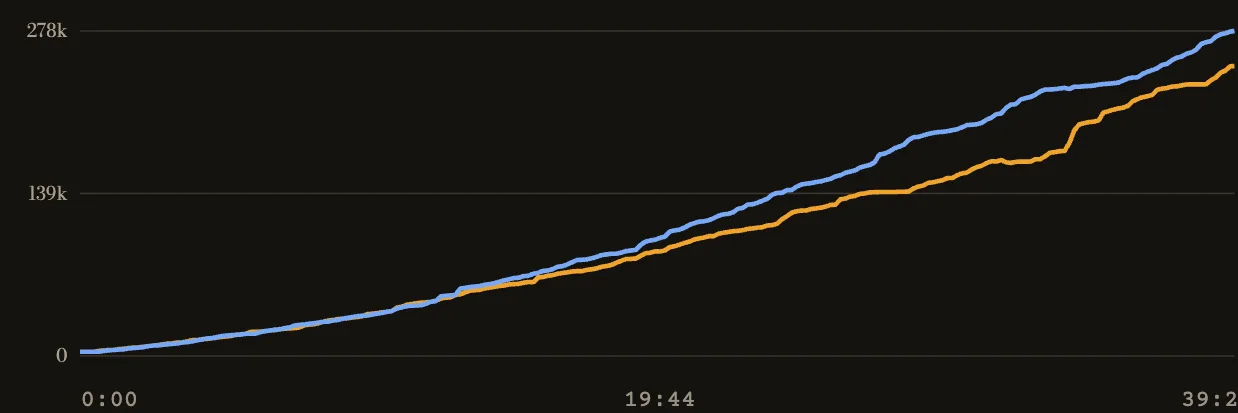
What the lines measure
Each line is a team's recorded souls over the match. Time runs left to right. The higher line has more souls at that point. The gap between the lines is the lead; a steep line means that team gained souls quickly.
In the example above, the lines stay close early. Sapphire's line rises above Amber's around the middle and the gap grows later. That tells you when the teams separated. The graph alone cannot tell you which fight or objective caused it.
Check a swing in the replay
- Pick the first place the gap widens or begins to close.
- Seek just before that minute on the viewer timeline. It marks kills and destroyed objectives above the souls lead.
- Pause and follow the heroes in the area. Watch what happened before the event, then what each team took afterward.
- Compare the team totals and purchase times on either side of the swing.
A kill near a rise does not establish the cause. A team may gain souls elsewhere while the fight is still happening. The map and event feed let you check the sequence.
When the lines meet
A crossing means the team with more recorded souls changed. Rewind before it and check whether the trailing team won a fight, took an objective or collected souls elsewhere on the map. If the lines stay close, use kills and structures to choose a moment instead of forcing a story from a small gap.